Explore project structure
This page looks at the file structure of a typical project in Quix, as hosted in its Git repository.
A project in Quix maps to a Git repository. Within a project you can create multiple environments, and these correspond to branches in the Git repository. Within a branch (environment) there are some root files. The most important is quix.yaml, the pipeline descriptor that defines the pipeline. Each application in the pipeline also has its own folder, containing its code and its application descriptor, app.yaml, alongside files such as main.py. Both descriptors matter. The app.yaml configures the whole application — its language, Dockerfile, entry point, and the default values for its variables. From descriptor version 2.0, each quix.yaml deployment inherits those variable defaults and declares a variable only to override it for that deployment, rather than repeating them all.
Pipeline
This section shows an example pipeline consisting of one application, Demo Data, as illustrated by the following screenshot:
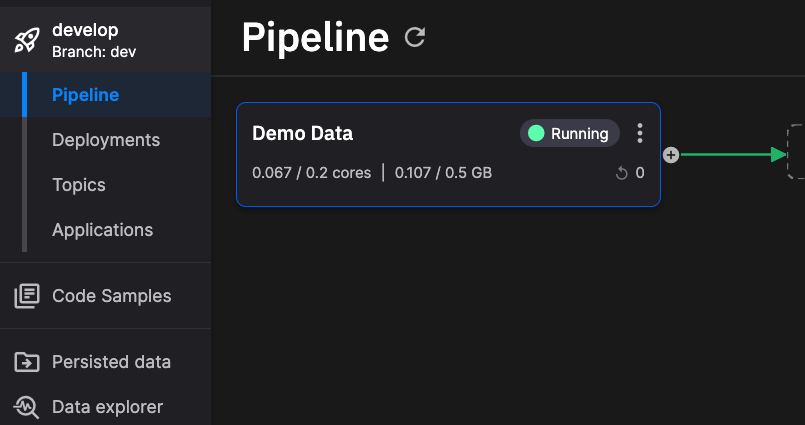
Looking at the project stored in Git, it would have the following structure:

Note the quix.yaml file that defines the pipeline, and the Demo Data folder for the application, which holds its own app.yaml. Under descriptor version 2.0 the two work together: each app.yaml defines its application's defaults — its variables' default values, plus build and runtime settings — and quix.yaml assembles the deployments, inheriting those defaults and overriding a variable only where a deployment needs a different value.
The complete quix.yaml file is shown here, using descriptor version 2.0:
# Quix Project Descriptor
# This file describes the data pipeline and configuration of resources of a Quix Project.

metadata:
  version: 2.0

# This section describes the Deployments of the data pipeline
deployments:
  - name: Demo Data
    application: Demo Data
    deploymentType: Job
    version: ada522b5199fc9667505b4dd19980995804ca764
    resources:
      limits:
        cpu: 200
        memory: 200
      replicas: 1
    libraryItemId: 7abe02e1-1e75-4783-864c-46b930b42afe

# This section describes the Topics of the data pipeline
topics:
  - name: f1-data
    persisted: false
    configuration:
      partitions: 2
      replicationFactor: 2
      retentionInMinutes: -1
      retentionInBytes: 262144000
This defines one or more deployments and their allocated resources, along with other information such as the code commit version to use, here ada522b. The resources block holds the CPU and memory limits in millicores and MB, the replica count and, optionally, the CPU and memory requests; see deployment sizes and resources for what each value means and how a request is resolved when it is omitted. The topics in the pipeline are also defined here. Note there is no variables: block on the deployment: under version 2.0 the deployment inherits its variables — such as the Topic output — from the application's app.yaml, so they are not repeated in quix.yaml. See YAML 1.0 and 2.0 for how inheritance works and how the versions differ.
Application
Opening the Demo Data folder in the Git repository, you see the structure of the application (one service in the pipeline) itself:
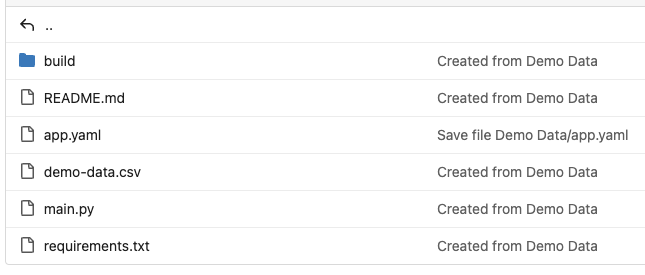
The notable file here is the app.yaml file that defines important aspects of the application. The full app.yaml for this application is shown here:
name: Demo Data
language: python
variables:
  - name: Topic
    inputType: OutputTopic
    description: Name of the output topic to write into
    defaultValue: f1-data
    required: true
dockerfile: build/dockerfile
runEntryPoint: main.py
defaultFile: main.py
Variable input types
Variables can use different input types to control how they appear in the UI. The Options input type lets you define a set of predefined values that users can select from:
variables:
  - name: CONTENT_STORE
    inputType: Options
    description: Where to store the content
    defaultValue: mongo
    options:
      - label: MongoDB
        value: mongo
      - label: File System
        value: file
Each option has a label (shown in the UI dropdown) and a value (the actual value set in the environment variable).
The available input types are:
| Input type | Use |
|---|---|
FreeText |
A plain text value. |
HiddenText |
A plain text value masked in the UI (not a managed secret). |
InputTopic / OutputTopic |
A topic the application reads from / writes to. |
Options |
A selection from a predefined label/value list (the list lives in app.yaml). |
ProjectVariable |
A value looked up from the project's variables store; set secret: true for sensitive values such as API keys. |
VariableGroup |
A reference to an organization-level variable group. A single non-secret member can also be substituted into a quix.yaml field individually with {{ groupId:variableKey }} — see Global variables → Pattern 1. |
To store a secret such as an API key, use a ProjectVariable with secret: true — the modern replacement for the older Secret input type:
variables:
  - name: API_KEY
    inputType: ProjectVariable
    description: Third-party API key
    secret: true
    defaultValue: THIRD_PARTY_API_KEY
    required: true
See Project variables for how project variables resolve per environment.
This provides a reference to the Dockerfile that is to be used to build the application before it is deployed. This is located in the build directory, and the full Dockerfile for this application is shown here:
FROM python:3.11.1-slim-buster

ENV DEBIAN_FRONTEND="noninteractive"
ENV PYTHONUNBUFFERED=1
ENV PYTHONIOENCODING=UTF-8

WORKDIR /app
COPY --from=git /project .
RUN find | grep requirements.txt | xargs -I '{}' python3 -m pip install -i http://pip-cache.pip-cache.svc.cluster.local/simple --trusted-host pip-cache.pip-cache.svc.cluster.local -r '{}' --extra-index-url https://pypi.org/simple --extra-index-url https://pkgs.dev.azure.com/quix-analytics/53f7fe95-59fe-4307-b479-2473b96de6d1/_packaging/public/pypi/simple/
ENTRYPOINT ["python3", "main.py"]
This defines the build environment used to create the container image that will run in Kubernetes.
As well as the app.yaml the application folder also contains the actual code for the service, in this case in main.py - the complete Python code for the application.
There is also a requirements.txt file - this is the standard Python file that lists modules to be installed. In this case there is only one requirement that is "pip installed" as part of the build process, the Quix Streams client library.
Any data files required by the application can also be located in the application's folder. In this example there is a demo-data.csv file that is loaded by the application code.
While this documentation has explored a simple project consisting of a pipeline with one application (service), pipelines with multiple applications have a similar structure, with a quix.yaml defining the pipeline, and with each application having its own folder, containing its application-specific files and an app.yaml file.
Tip
Your project repository can also include Git submodules to reference external repositories. See Git submodules for details and limitations.
.png)