Environment variables
An environment variable is the basic form of runtime configuration that application code receives: a name/value pair that Quix makes available to your deployment's container. Your application reads it from its process environment, for example as os.environ["LOG_LEVEL"] in Python.
Project variables and global-variable groups are value sources. When you bind either one with inputType, the container still receives ordinary environment variables.
In quix.yaml, add them under a deployment's variables: list. Each entry has a name and an inputType. The inputType selects the value source; it does not change how your code reads the resulting value.
The examples below show deployment-level entries in quix.yaml. An application can instead define variables once in app.yaml and let its deployments inherit them; see YAML 1.0 and 2.0 for that inheritance model.
Choose a value source with inputType
For runtime configuration, use one of these value sources:
FreeTextreads the literalvalue:in this deployment. Use it when the value is non-sensitive and does not need to change between environments.ProjectVariablereads one project variable, selected withvariableKey. Use it when the value differs by environment, is a secret, or is reused by deployments in one project.VariableGroupreads every member of one global-variable group, selected withvariableGroupId. Use it when related configuration or credentials are shared by more than one project.
Applications also support topic, option, and other input types. See the complete input-type reference when you are defining an application's interface rather than supplying its runtime configuration.
For FreeText and ProjectVariable, name is the environment-variable name your code receives. A VariableGroup binding is different: its name is a label in the YAML and UI; Quix injects one environment variable for each member of the group.
Literal value: FreeText
Use a literal value for configuration that belongs to one deployment and is safe to keep in YAML:
This makes LOG_LEVEL=info available when my-service runs.
Project value: ProjectVariable
Bind one project variable when the runtime value changes by environment or must remain secret:
deployments:
  - name: my-service
    variables:
      - name: API_KEY
        inputType: ProjectVariable
        variableKey: API_KEY
        required: true
The container receives API_KEY. Quix resolves its value when the deployment starts; the secret or environment-specific value is not written into quix.yaml. See Project variables for the complete pattern.
Set required: true on a binding when the deployment must fail rather than start without a value it cannot resolve.
Shared values: VariableGroup
Bind a global-variable group when the deployment needs all the group's values:
deployments:
  - name: my-service
    variables:
      - name: redis
        inputType: VariableGroup
        variableGroupId: redis-config
        required: true
If redis-config contains REDIS_HOST, REDIS_PORT, and REDIS_PASSWORD, Quix injects all three into the container. See Global variables for group setup, value sets, and the complete pattern.
Read the value in your code
Your code reads every injected value by name, regardless of which inputType supplied it:
import os

log_level = os.environ["LOG_LEVEL"]
api_key = os.environ["API_KEY"]
redis_host = os.environ["REDIS_HOST"]
When a value changes
Environment variables are fixed for the lifetime of a running container; Quix does not rewrite its process environment in place. Redeploy to start a new container with the latest literal, project-variable, or variable-group values. Syncing an environment can detect a changed bound value and trigger that redeployment for you.
Binding is not {{ }} substitution
An inputType entry binds a value to the container environment. Use it for configuration that application code reads at runtime, especially secrets.
{{ }} substitution does something else: it writes a resolved non-secret value into a quix.yaml field when you sync the environment. It does not create an environment variable for your code. For example, use {{ REPLICAS }} to vary a deployment's replica count, not to provide REPLICAS to the process environment.
See Variables overview for the decision guide and timing comparison. Quix also provides platform variables that your deployment can read without declaring them here.
Add an environment variable in the UI
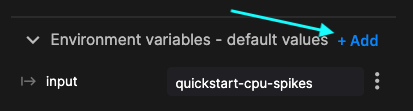
Open the code view for your service. In the Environment variables panel, click + Add, enter the name, then choose the value source. Quix writes the corresponding variables: entry to the deployment configuration.
.png)