Data Lake API
The Data Lake API powers the Data Lake UI and also exposes a clean surface for your own applications to tag datasets, search, discover files, and perform safe deletes/restores.
Lakehouse SQL?
This API is for the Data Lake (raw Avro + Parquet index). For SQL queries over Lakehouse tables, see Lakehouse Query.
Connection
- Authenticate with a Bearer JWT in the
Authorizationheader. - Most routes are namespaced by workspace and topic.
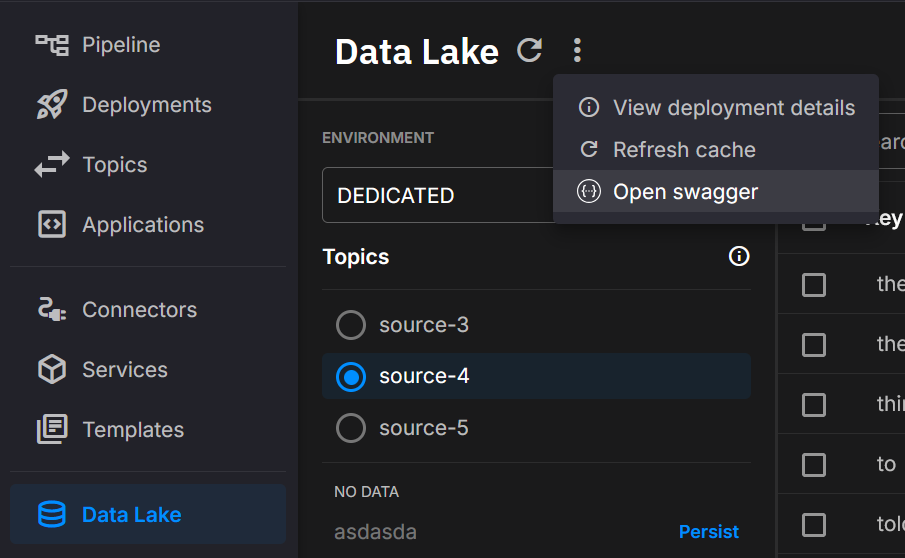
- You can open the in-product Swagger from the catalog header in the Data Lake UI.
Catalog endpoints
The Catalog endpoints powers discovery features across workspaces and topics. These endpoints let you search indexed stream metadata, explore available topics and keys, and manage cache refreshes to ensure results are up to date.
Use these routes to:
- Perform flexible searches (text, fuzzy, prefix/suffix, and time-bound queries).
- Enumerate available topics, keys, and metadata facets for filtering.
- Keep catalog results fresh with cache refresh operations at the workspace or topic level.
- Retrieve workspace and global metadata keys to support consistent UI-driven filtering.
Together, these endpoints back the catalog’s search grid, topic/key lists, and filtering facets.
Search stream metadata
POST /{workspaceId}/{topic}/search
Searches stream metadata and returns matches with a total count for paging and analytics. Results mirror the catalog grid in the Data Lake UI. Supports free text, exact/prefix/suffix/fuzzy matching, time windows, sorting, paging, and optional inclusion of all tag fields.
Behavior notes
- Results reflect the latest indexed state; use the refresh endpoints below if you need to surface brand-new data immediately.
- Soft-deleted items can be included or excluded based on flags in the request.
Refresh workspace caches
POST /{workspaceId}/refresh-cache
Refreshes metadata/index caches so newly ingested datasets become visible promptly.
Refresh topic caches
POST /{workspaceId}/{topic}/refresh-cache
Refreshes caches scoped to a single topic. Useful after large backfills or when onboarding a new topic.
Get topic keys
GET /{workspaceId}/{topic}/keys
Lists all keys for a topic (the same values used by the key filter).
Get data density
GET /{workspaceId}/{topic}/density
Returns a histogram of data over time for a topic. Optional query parameters: bucketCount, fromTimestamp, toTimestamp, keys, and partitions.
List existing topics
GET /{workspaceId}/topics
Returns all topics detected in a workspace so clients can drive topic pickers and filters.
Get workspace topic metadata keys
GET /{workspaceId}/{topic}/metadata-keys
Returns distinct metadata keys seen for a topic (drives metadata facets for that topic).
Get workspace metadata keys
GET /{workspaceId}/metadata-keys
Returns distinct metadata keys across a workspace.
Get all metadata keys
GET /metadata-keys
Returns all known metadata keys across all accessible workspaces.
List accessible workspaces
GET /all-workspaces
Returns workspace identifiers that have discoverable data for the caller.
Consolidate metadata files
POST /{workspaceId}/consolidate
POST /{workspaceId}/{topic}/consolidate
POST /{workspaceId}/{topic}/{key}/consolidate
Queues a merge of the index and metadata Parquet files into one file per stream, for a workspace, a topic, or one key. The call returns 202 Accepted and the work runs in the background. The API skips a key that has a file changed in the last 24 hours. Add ?force=true to turn this check off.
The API also consolidates every workspace each night at 02:30 UTC, with the same 24-hour check.
Note
The search response includes a total-count header so clients can page results consistently with the UI.
Data endpoints
The Data endpoints provides direct visibility into raw storage objects and their temporal ranges. These endpoints are designed for operational use cases such as exports, audits, verification, and impact analysis.
Use these routes to:
- Enumerate the exact Avro segment files that make up a selection.
- Identify all files associated with a key to preview or audit deletions.
- Compute temporal bounds (min/max timestamps and partitions) for sets of keys.
Together, these endpoints give precise, programmatic insight into how cataloged data is physically stored and bounded in time.
Get timestamped file descriptors
GET /data/raw/{workspaceId}/{topic}/files
Returns descriptors of Avro segments (paths, counts, offsets, sizes) filtered by window, keys, and partitions. Use this to enumerate exactly which objects comprise a selection.
List files affected by deletion
GET /data/{workspaceId}/{topic}/{key}/all-files
Returns every storage path that would be touched by deleting a specific key. Helpful for previews, audits, or impact analysis.
Compute temporal bounds for keys
POST /metadata/{workspaceId}/{topic}/range-info
Reports minimum/maximum timestamps and observed partitions for a set of keys. Useful for building sensible default windows.
Tip
A common flow is to use search to find candidate keys, then use files to enumerate exact object paths.
Data Deletion endpoints
The Data Deletion endpoints supports safe lifecycle management of cataloged data. By default, deletions are soft, preserving underlying files and enabling recovery. When required, hard deletes can permanently remove both metadata and storage objects.
Use these routes to:
- Delete metadata and files for a single key or multiple keys (soft or hard).
- Restore streams that were previously soft-deleted, individually or in batches.
These operations ensure controlled data cleanup while supporting compliance and recovery workflows.
Delete metadata/files for a single key
DELETE /data/{workspaceId}/{topic}/{key}
Marks or permanently removes data for one key depending on the delete mode.
Batch delete metadata/files
POST /data/{workspaceId}/{topic}/delete
Marks or permanently removes data for multiple keys in one call.
Restore a soft-deleted stream
POST /data/{workspaceId}/{topic}/{key}/restore
Clears the soft-delete marker for a single key.
Batch restore soft-deleted streams
POST /data/{workspaceId}/{topic}/restore/all
Restores every soft-deleted key of the topic. The call takes no body.
Warning
Use hard delete only when retention and compliance requirements allow it.
Soft-deleted items do not stay
The API removes a soft-deleted item permanently 1 hour after the deletion. A scan for expired items runs every 5 minutes. Restore an item before the hour ends.
Metadata endpoints
The Metadata endpoints lets you enrich datasets with custom key/value properties and query them later for grouping, filtering, lineage, and auditing. This is especially useful when working with datasets produced by the Data Lake Sink, enabling your applications to attach meaningful business or operational context.
Typical metadata examples include:
- Machine or device identifiers
- Sensor calibration ranges
- Driver, batch, or run identifiers
- Experiment tags or quality tiers
- Flattened JSON values
Use these routes to:
- Add or update metadata properties for a key.
- Retrieve all metadata associated with a key.
- Soft-delete all metadata for a key, or selectively remove specific properties.
These operations provide a lightweight but powerful mechanism for managing dataset context across both API and UI.
Upsert metadata entries
PATCH /metadata/{workspaceId}/{topic}/{key}
Adds new properties or updates existing ones for a key. Idempotent and safe to call frequently from your systems.
Get metadata for a key
GET /metadata/{workspaceId}/{topic}/{key}
Returns all properties associated with a key for verification, lineage, and governance.
Soft-delete all metadata for a key
DELETE /metadata/{workspaceId}/{topic}/{key}
Marks all metadata entries for a key as deleted without touching raw files.
Delete specific metadata keys
POST /metadata/{workspaceId}/{topic}/{key}/delete
Removes only the listed property names.
Tip
When searching, you can request the full tag set per result to drive rules without extra reads.
Explorer endpoints
The Explorer endpoints browse and change the files in your storage. Most routes take the file or folder in the path query parameter.
GET /explorer/list— lists the entries underpath, one level at a time, with paging.GET /explorer/search— searches file and folder names underpathfor thequerytext.GET /explorer/stat— returns the details of one entry.GET /explorer/download— downloads a file.GET /explorer/stream— streams a file inline, so a browser can show an image, audio, or video.GET /explorer/download-folder— downloads a folder as a zip file.POST /explorer/upload— uploads a file. Addoverwrite=trueto replace a file that exists.POST /explorer/folder— makes an empty folder.DELETE /explorer/entry— deletes a file or folder. Addrecursive=trueto delete a folder that is not empty.POST /explorer/rename— renames or moves an entry inside the same top-level folder. The body givesfromandto.
Security
- Authenticate with Bearer JWT.
- Authorization is enforced per workspace; a token only reaches the workspaces it belongs to. See the Storage permissions.
.png)